AI PRD Maker
A modular, multi-AI pipeline that turns your app idea into a production-grade Product Requirements Document -- complete with UML diagrams, database schemas, and technical specifications.
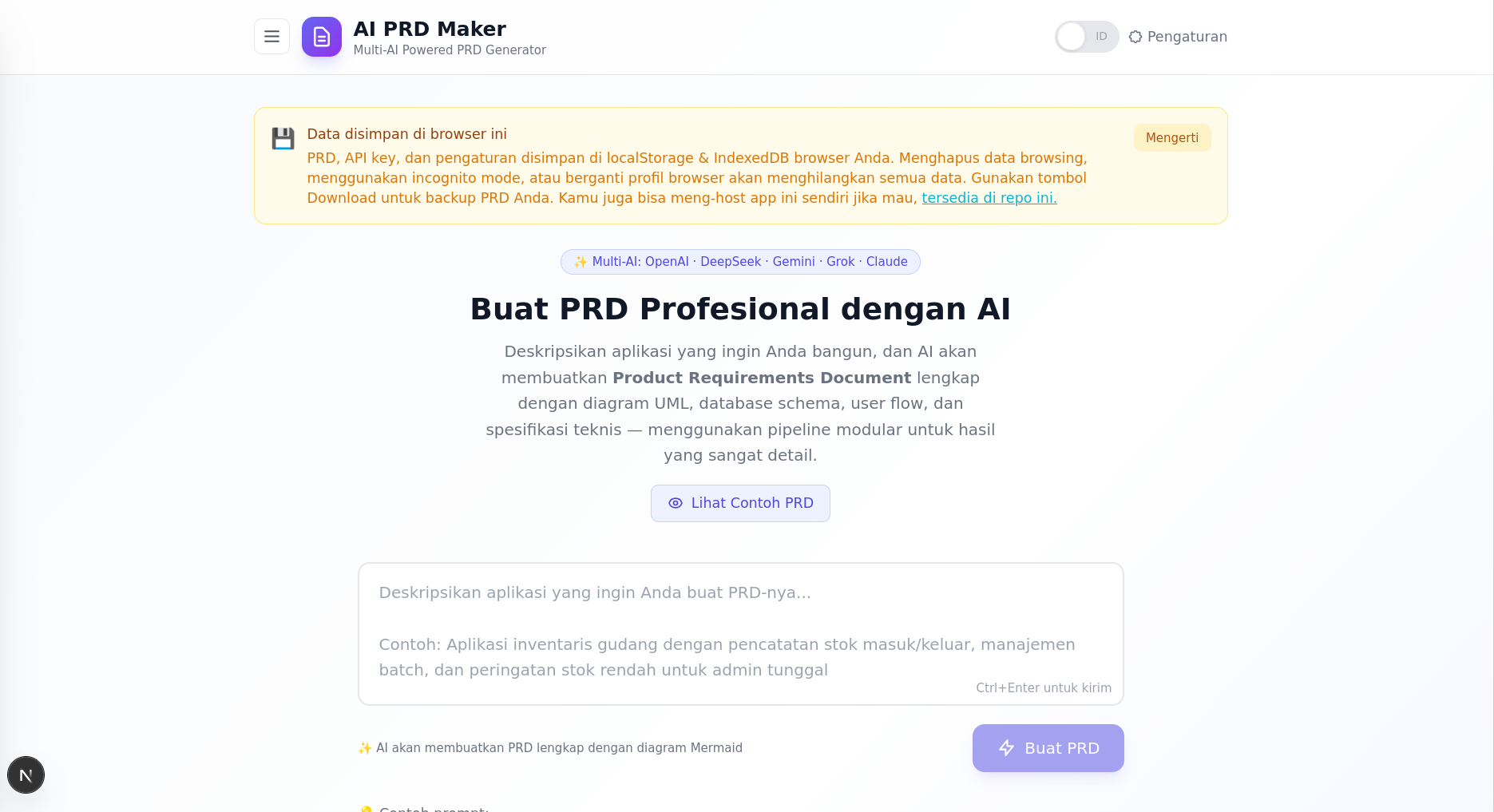
 Main interface: entering a prompt, watching the pipeline progress, and viewing the generated PRD
What It Does
Describe the application you want to build, and AI PRD Maker generates a comprehensive PRD through a 7-stage modular pipeline. Each stage is handled by a dedicated AI call with its own system prompt, accumulating context across stages to produce deeply consistent, detailed output.
The result is a 600-2000+ line Markdown document with embedded Mermaid diagrams (sequence diagrams, ERDs), user flows, core features, and full technical requirements -- ready to share with your team, investors, or developers.
Highlights
- 7-Stage Modular Pipeline -- Analysis, Features, User Flows, Architecture, Database Schema, Technical Requirements, and Final Assembly. Each stage builds on the previous, ensuring every section is grounded in the product analysis.
- 5 AI Providers -- OpenAI, DeepSeek, Google Gemini, xAI Grok, and Anthropic Claude. Switch between them in Settings with per-provider API key storage.
- Real-Time Progress -- Watch each pipeline phase complete live in the loading screen. See exactly what's happening under the hood.
- Interactive Chat Revision -- After generating a PRD, open the chat panel to request changes. The AI revises the full document while preserving Mermaid diagrams and untouched sections.
- Mermaid Diagram Rendering -- Architecture sequence diagrams and database ERDs are rendered inline, with fullscreen zoom support.
- Bilingual UI -- Toggle between English and Indonesian. System prompts, example prompts, and the generated PRD language follow your choice.
- Local-First Storage -- PRDs, chat history, and settings are saved to your browser (IndexedDB + localStorage). No server-side storage. Export to
.mdfor backup. - Customizable Prompts -- Edit the system prompt for any pipeline stage. Customizations are saved per-language so your English and Indonesian prompt tweaks stay independent.
- Hardware-Ready Prompts -- Built-in detailed example prompts for SaaS restaurant POS, clinic management systems, and more.
Architecture
User Prompt
    |
    v
Stage 1: Product Analysis (JSON)          -- deep-dive into product idea
    |
    v
Stage 2: Sequential Section Generation    -- each section sees all previous output
    |-- 2a: Core Features
    |-- 2b: User Flows
    |-- 2c: System Architecture (Mermaid)
    |-- 2d: Database Schema (Mermaid ERD)
    |-- 2e: Technical Requirements
    |
    v
Stage 3: Final Assembly                   -- AI generates Overview + Design Constraints
    |                                       programmatic concatenation of all sections
    v
Complete PRD (Markdown with embedded diagrams)
Screenshots

Mermaid diagrams rendered inline with fullscreen zoom

Settings panel: 5 AI providers, per-provider API keys, model selection, and customizable prompts
Tech Stack
| Layer | Technology |
|---|---|
| Framework | Next.js 15 (App Router) |
| Language | TypeScript |
| Styling | Tailwind CSS 3 |
| AI Providers | OpenAI, DeepSeek, Google Gemini, xAI Grok, Anthropic Claude |
| Markdown | react-markdown + remark-gfm + rehype-raw |
| Diagrams | Mermaid 11 |
| Storage | IndexedDB + localStorage (client-side only) |
| i18n | Custom lightweight translation system |
| Runtime | Node.js |
Getting Started
Prerequisites
- Node.js 18+
- An API key from at least one supported provider (DeepSeek is the default)
Installation
git clone https://github.com/Arfith/ai-prd-maker.git
cd ai-prd-maker/source_code
npm install
Development
npm run dev
Open http://localhost:3000.
Production
npm run build
npm start
Configuration
API keys can be set in two ways:
Browser Settings (recommended) -- Click the gear icon in the header, select your provider, and enter the API key. Each provider's key is stored separately in localStorage.
Environment Variables -- Set provider-specific variables in .env.local:
OPENAI_API_KEY=sk-...
DEEPSEEK_API_KEY=sk-...
GEMINI_API_KEY=...
GROK_API_KEY=...
ANTHROPIC_API_KEY=sk-ant-...
DEFAULT_AI_PROVIDER=deepseek
Browser-provided keys take precedence over environment variables.
Project Structure
source_code/src/
├── app/
│   ├── api/
│   │   ├── generate-prd/route.ts      # SSE-streaming PRD generation
│   │   ├── chat-revision/route.ts     # Chat-based PRD revision
│   │   └── list-models/route.ts       # Fetch available AI models
│   ├── layout.tsx
│   └── page.tsx                       # Main application page
├── components/
│   ├── PromptInput.tsx                # Prompt input with example prompts
│   ├── PrdViewer.tsx                  # Markdown viewer with toolbar
│   ├── ChatPanel.tsx                  # Interactive chat revision
│   ├── PrdHistory.tsx                 # Saved PRDs drawer (IndexedDB)
│   ├── SettingsModal.tsx              # Provider, API key, model settings
│   ├── PromptEditor.tsx               # Customize system prompts per stage
│   ├── MarkdownRenderer.tsx           # Markdown + Mermaid rendering
│   └── MermaidRenderer.tsx            # Mermaid diagram with zoom
└── lib/
    ├── prd-generator.ts               # 7-stage modular pipeline
    ├── prompts.ts                     # System prompts (ID + EN)
    ├── prompt-customization.ts        # Per-language prompt overrides
    ├── prd-db.ts                      # IndexedDB wrapper
    ├── i18n.ts                        # Translation system
    ├── modelList.ts                   # Dynamic model fetching
    ├── types.ts                       # Shared TypeScript types
    └── providers/
        ├── types.ts                   # Provider interface + metadata
        ├── registry.ts                # Provider resolution
        ├── openai-compatible.ts       # OpenAI, DeepSeek, Grok
        ├── gemini.ts                  # Google Gemini
        └── anthropic.ts               # Anthropic Claude
License
MIT
Built with Next.js and a modular pipeline architecture. No server-side storage -- your data stays in your browser.